Record identification rules is a work stream function where the system will try to match a customer and case to a new conversation. These rules are defined by... drumroll please... creating a fetchxml that you have to upload to a locked column on the work stream. With all the benefits of:
- Being domain specific, so job security
- No validation, so you get to reiterate as much as you (dis)like
- Requiring use of API to change it, so only pro-code friendly
- Has an unmodifiable default rule which is designed for chat, so has to be done for every new work stream
- Has hidden functionality, so you can only learn by trial and error
- Only supports contact, account and case (incident), so it has almost no flexibility
With that high praise out of the way, let's dive into the post shall we?
The challenge
When an inbound conversation lands in a work stream, the record identification rules will be run 2 times, once before the (optional) AI agent and once after. That means if it can't match anything before the AI agent runs, then it might be able to do it after the AI agent has had the choice to enrich or qualify the data, maybe even do some identification and authorization.
However, there's a gotcha in this process:
It will only match 1 time for each table
This simply means, if you get a match on the Contact table before your AI agent runs, it will not try to match again after the AI agent has run. To put this in an example:
- You want to match the inbound call on their social security number (SSN), if no matches are found, match on the phone number
- Call comes in, record identification rule runs, no SSN has been entered yet so it matches on phone number. Finds a contact and associates to the conversation record
- AI agent asks for SSN, customer enters an SSN, and call is transferred/escalated to an agent
- Record identification rule runs again, but it already found a match in the Contact table so it will not try to match again
Now this isn't a problem if the SSN and phone number are both connected to the same Contact record, but what if they don't? Like if you're using somebody else's phone, or you're entering your grandma's SSN?

The solution, use a custom variable
Okay Mr Smartypants with your 2002 pop culture references, what is the solution? First, we set up our own global variable in copilot studio, let's call this "identificator".
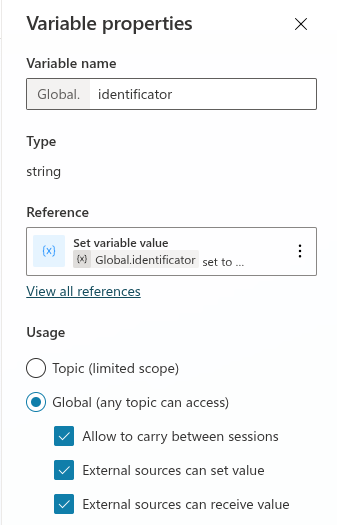
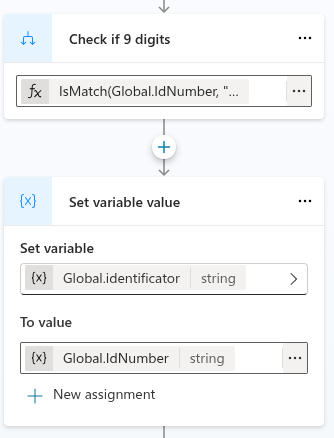
Then we do all of our business logic to identify the customer, in our case we simply ask for a 9 digit SSN and store it to a variable. Our little chef's kiss is a simply conditional statement where we set identificator value, if the entered SSN is 9 numbers, we put it in there. If not, we put the phone number in there.
Next we need to update our record identification rules. As mentioned before, all work streams come with a default one, and it can be okay for chat, if you only use basic OOB columns. But we need something bigger, and stronger! So here's the specific one for matching contacts (I'm not turning this post into a masterclass into how to edit these rules, but leave a comment or DM me if you want me to make a post on it)
<RecordIdentificationRule>
   <PrimaryEntity LogicalCollectionName="contacts" PrimaryKeyAttribute="contactid" PrimaryNameAttribute="fullname" />
   <fetch version="1.0" output-format="xml-platform" mapping="logical" top="2">
      <entity name="contact">
         <attribute name="contactid" />
         <attribute name="fullname" />
         <filter type="and">
            <condition attribute="statuscode" operator="eq" value="1" />
            <filter type="or">
               <filter type="and">
                  <condition attribute="mal_ssn" operator="ne" value="" />
                  <condition attribute="mal_ssn" operator="eq" value="${identificator}" />
               </filter>
               <filter type="and">
                  <condition attribute="mobilephone" operator="ne" value="" />
                  <condition attribute="mobilephone" operator="eq" value="${identificator}" />
               </filter>
            </filter>
         </filter>
      </entity>
   </fetch>
   <ContextKey name="msdyn_contact_msdyn_ocliveworkitem_Customer" isPreferred="true" />
</RecordIdentificationRule>
So in this rule we have to groups of matches.
- Verify that mal_ssn is NOT empty and equal to the identificator variable
- Verify that mobilephone is NOT empty and equal to the identificator variable
So when a call comes in, the identificator variable is empty, because the AI agent has not run yet so no value has been set, so it will never match since the rule groups filter out empty values.
After the AI agent has run, it will match if the mal_ssn matches, or if the mobilephone matches. So the only ways to get wrong matches is if we have horrible data quality (duplicates on SSN? Not in my dataverse).